library(tidyverse)library(quantmod)xts.stock <-getSymbols("AAPL", from ="2026-01-01", to ="2026-06-01",auto.assign = F)# list of companies (print out ALL.STOCK to see)ALL.STOCK <-stockSymbols()# try these functions to understand the returned R object#class(xts.stock)#plot(xts.stock$AAPL.Open)#index(xts.stock)#coredata(xts.stock)# convert to data framedf.stock <-data.frame(Date =index(xts.stock), coredata(xts.stock))# change the name to get rid of "AAPL"names(df.stock) <-sub(".*?\\.", "", names(df.stock))head(df.stock)
We have been using a lot of R functions. They all have the same format: function_name (argument1, argument2, …)
vec1 <-c(1:5)mean(vec1)
[1] 3
Name: mean
Input: a numeric vector
Output: the average of all the numbers in the vector
Example 1
Write a function that calculates the difference of the first element in two given vectors.
Name: f.diff
Input: two vectors (a and b)
Output: a numeric value (result)
f.diff <-function(a,b){ result <- a[1] - b[1]return(result)}
you don’t need to declare the inputs (a and b)
you DO need to declare the output (result)
Try (recall, you can use tab to display arguments of the function):
f.diff(2, 3)
[1] -1
f.diff(c(1:5),c(5,10))
[1] -4
f.diff(a=c(1:5),b=c(5,10)) # full version
[1] -4
General structure of a function
Function name: avoid using names that will override existing functions (e.g.: don’t write a function and name it something like plot or mean).
Input(s): you can have more than one inputs
Output: you can return only one R object; you can also return nothing
function_name <-function(input1, input2, ...){ CODE TO CREATE "result" ASSUMING THAT "input1", "input2",... EXISTreturn(result)}
Calling function
The objects a and b only live in the local environment (i.e., they only exist inside the function). Try print the value of a: R will say it is not found. When you call the function, you assign new values to a and b, which will then be passed into the function.
If you do not specify the argument names, the order of the arguments matter:
a=2; b=1f.diff(a,b)
[1] 1
f.diff(a,a)
[1] 0
f.diff(b,a)
[1] -1
If you specify the argument names, the order of the arguments does NOT matter:
f.diff(b=5,a=3)
[1] -2
f.diff(b=b,a=a)
[1] 1
f.diff(b=a,a=b)
[1] -1
Example 2
Exercise: write a function that calculates the total length of 3 vectors. It should run like this:
f.length <-function(a,b,c){ result <-sum(length(a),length(b),length(c))return(result)}
In addition, you can include things like plot(), print(), cat() as part of the function; you can also add a DEFAULT value to any input.
Show code
f.length <-function(a,b,c,print=T){ result <-sum(length(a),length(b),length(c))if(print){cat("Lengths:", length(a),length(b),length(c)) }return(result)}
You can now use this function:
tot <-f.length(vec1,vec2,vec3); tot
Lengths: 50 1 4
[1] 55
tot <-f.length(vec1,vec2,vec3,print=F); tot
[1] 55
Total length (55 in this case) is stored in tot for later use
The argument print controls whether or not you want to print the information when running the function (default to TRUE)
Default values
For any R function, when an argument is not specified:
if there is a default, then the default is used
if there is no default, then an error message occurs
?cor# you can see arguments with and without default valuescor(df.stock$Open, df.stock$Close)cor(df.stock$Open) # not runcor(y=df.stock$Open) # not run
Return multiple things in a list
Recall, you can only return one R object. If you want to return multiple things, you need to put them together in one list. For example, mymodel stores the list returned by the function lm (try mymodel$).
mymodel <-lm(df.stock$Close ~ df.stock$Open)
Example 3
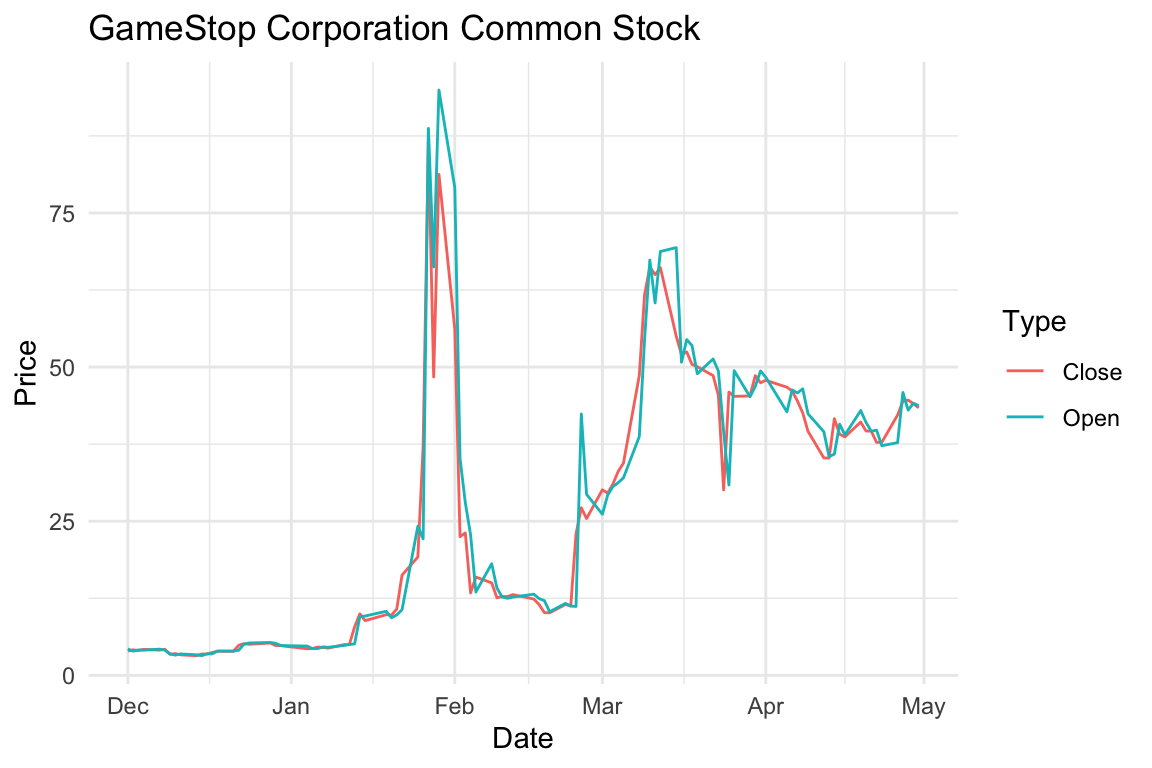
Write a function that will get the specified stock price information and returns a data frame, as well as name of the stock (recall, this information is stored in ALL.STOCK). It should work like this: