Lecture 7: Loops and IF conditions

Data: rolling a dice

Prep work - output information

Recall, you can directly print out the contents of an R object by running it

library(tidyverse)
library(Lock5Data)
NBAPlayers2024$Player[1]
[1] "Luka Doncic"

But in loop and conditional structures (more on this soon), this doesn’t work

for(i in 1:2){
  NBAPlayers2024$Player[i]
}

Instead, a print( ) or cat( ) function is needed (both functions are used to output information, but they behave slightly differently; print will print out an R object and cat will concatenate an R object into text):

for(i in 1:2){
  cat(NBAPlayers2024$Player[i])
}
Luka DoncicShai Gilgeous-Alexander
for(i in 1:2){
  print(NBAPlayers2024$Player[i])
}
[1] "Luka Doncic"
[1] "Shai Gilgeous-Alexander"

You can also paste texts together:

paste('The average age is', mean(NBAPlayers2024$Age), "years old")
[1] "The average age is 26.3080168776371 years old"
paste0('The average age is', mean(NBAPlayers2024$Age), "years old")
[1] "The average age is26.3080168776371years old"
cat('The average age is', mean(NBAPlayers2024$Age), "years old")
The average age is 26.30802 years old

paste and cat behave differently for vectors; also note R’s behavior of recycling the shorter vector when needed:

animal <- c('dog','cat')
id <- c(1:5)
cat(animal, id)
dog cat 1 2 3 4 5
paste(animal, id)
[1] "dog 1" "cat 2" "dog 3" "cat 4" "dog 5"

FOR loops

General structure

FOR loops allow you to repeatedly run the same chunk of code for a FIXED number of times.

for(INDEX in VECTOR){
  CODE TO RUN REPEATEDLY FOR EACH INDEX
}
  • Try:
for(i in 1:10){
  print(i)
}
  • Note: the index (named “i” in the example) does not have to pre-defined; it is created when you run the loop; at the end of the loop, it has a value 10.

Exercise 1

What will be printed if I run the following FOR loops?

# (a)
for(i in c(5:10)){
  print(i)
}

# (b)
a <- 10
for(k in c(1,2,3)){
  print(k+a)
}

# (c)
v <- c(10,30,50,10,30,50,10,30,50)
for(i in c(3,6,9)){
  print(v[i])
}
Solution
# (a)
for(i in c(5:10)){
  print(i)
}
[1] 5
[1] 6
[1] 7
[1] 8
[1] 9
[1] 10
# (b)
a <- 10
for(k in c(1,2,3)){
  print(k+a)
}
[1] 11
[1] 12
[1] 13
# (c)
v <- c(10,30,50,10,30,50,10,30,50)
for(i in c(3,6,9)){
  print(v[i])
}
[1] 50
[1] 50
[1] 50

Exercise 2

Try:

for(a in c(4,7,6)){
  print(a+2)
}
for(num in seq(0,10,by=2)){
  print(paste('value of number is', num))
}

Exercise: use a FOR loop to print: “1+1=2”, “2+2=4”, …, “10+10=20”

Solution
for(i in 1:10){
  print(paste(i,"+",i,"=",i+i))
}
[1] "1 + 1 = 2"
[1] "2 + 2 = 4"
[1] "3 + 3 = 6"
[1] "4 + 4 = 8"
[1] "5 + 5 = 10"
[1] "6 + 6 = 12"
[1] "7 + 7 = 14"
[1] "8 + 8 = 16"
[1] "9 + 9 = 18"
[1] "10 + 10 = 20"

Exercise 3: “fake coding” examples

  • Repeatedly “do something” for 10 times
Solution
for(i in 1:10){
  # do something
}
  • Repeatedly play a game for 1000 times, storing the result each time
Solution
# initialization
ngame <- 10000
result <- rep(NA, ngame)

for(i in 1:ngame){
  # play game, store result in A
  result[i] <- A
}

Important note: as you can see in the previous example, the R object result needs to be initialized first. There are two ways to do this:

# 1. initialize an empty vector
result <- numeric()

# 2. initialize a vector of desired length
result <- rep(NA, 10000) 
  • Benefit of the 1st method: you don’t need to know the length of result in advance
  • Benefit of the 2nd method: pre-allocate required CPU memory, which is more computationally efficient

Exercise 4

  • You can simulate the outcome of a fair die with sample(c(1:6), size=1); try it for a couple of times.
  • Do this simulation for 10 times and store your results in a vector.
Solution
results <- rep(NA, 10)
for(i in 1:10){
  results[i] <- sample(c(1:6), size=1)
}
print(results)

IF condition

General structure

IF condition allows you to run a chunk of code only when a certain condition is true.

if( CONDITION ){
  CHUNK OF CODES
}

CONDITION should be something that returns T/F (can be a single or a composite logical statement)

  • Try:
x=1; print(paste('the value of x is',x))
if(x!=0){
  print(paste('1/x =',1/x))
}
  • Change x to 2 and run it again; change x to 4 and run it again; change x to 0 and run it again…
  • Try: put the code in a for loop to reproduce this output
[1] "the value of x is 0"
[1] "the value of x is 1"
[1] "1/x = 1"
[1] "the value of x is 2"
[1] "1/x = 0.5"
[1] "the value of x is 3"
[1] "1/x = 0.333333333333333"
[1] "the value of x is 4"
[1] "1/x = 0.25"
Solution
for(x in c(0:4)){
print(paste('the value of x is',x))
  if(x!=0){
  print(paste('1/x =',1/x))
}
}
[1] "the value of x is 0"
[1] "the value of x is 1"
[1] "1/x = 1"
[1] "the value of x is 2"
[1] "1/x = 0.5"
[1] "the value of x is 3"
[1] "1/x = 0.333333333333333"
[1] "the value of x is 4"
[1] "1/x = 0.25"

Multiple IF conditions

  • You can have more than one if conditions. For example:
for(x in c((-5):3)){
  print(paste('the value of x is',x))
  if(x>0){
    print("x is positive")
  }
  if(x<0){
    print("x is negative")
  }
  if(x==0){
    print("x is 0")
  }
}
[1] "the value of x is -5"
[1] "x is negative"
[1] "the value of x is -4"
[1] "x is negative"
[1] "the value of x is -3"
[1] "x is negative"
[1] "the value of x is -2"
[1] "x is negative"
[1] "the value of x is -1"
[1] "x is negative"
[1] "the value of x is 0"
[1] "x is 0"
[1] "the value of x is 1"
[1] "x is positive"
[1] "the value of x is 2"
[1] "x is positive"
[1] "the value of x is 3"
[1] "x is positive"

else

You can add else to an if statement. This is especially useful if you only have two options.

if( CONDITION1 ){
  CHUNK OF CODE
}else{
  CHUNK OF CODE
}

For example, let’s simulate the following game for 10 times: you roll a fair dice; if it lands 6, you win $20; else you lose $5.

netwinning <- 0  # initialization
for(i in 1:10){
  dice <- sample(c(1:6),size=1)
  if(dice==6){
    netwinning=netwinning+20
  }else{
    netwinning=netwinning-5
  }
  print(paste(dice,netwinning))
}
[1] "5 -5"
[1] "3 -10"
[1] "4 -15"
[1] "3 -20"
[1] "2 -25"
[1] "4 -30"
[1] "4 -35"
[1] "6 -15"
[1] "1 -20"
[1] "5 -25"

else if

If you have more than two options, you can use multiple if statements, or you can use else if. Be careful about the differences in the following two scenarios:

a=20
if( a>10 ){
  print('a is greater than 10')
}
[1] "a is greater than 10"
if( a>5 ){
  print('a is greater than 5')
}
[1] "a is greater than 5"
if( a>0 ){
  print('a is positive')
}else{
  print('ELSE!')
}
[1] "a is positive"
a=20
if( a>10 ){
  print('a is greater than 10')
}else if( a>5 ){
  print('a is greater than 5')
}else if( a>0 ){
  print('a is positive')
}else{
  print('ELSE!')
}
[1] "a is greater than 10"
  • In (A): only the LAST TWO conditions are linked together

  • In (B): all of the conditions are linked together and only one will run

Exercise 5

Suppose you roll a dice; if you get a 6, you win; else you lose. Simulate this game for 10 times and print out whether you win or lose each time.

Solution
for(i in 1:10){
  dice <- sample(c(1:6), size=1)
  if(dice == 6){
    print(paste("You win with roll", dice))
  }else{
    print(paste("You lose with roll", dice))
  }
}
[1] "You lose with roll 1"
[1] "You lose with roll 1"
[1] "You lose with roll 5"
[1] "You lose with roll 3"
[1] "You lose with roll 1"
[1] "You lose with roll 2"
[1] "You lose with roll 1"
[1] "You lose with roll 5"
[1] "You lose with roll 5"
[1] "You lose with roll 5"

WHILE loops

General structure

WHILE loops allow you to run code repeatedly, as long as the condition is satisfied

  • If you want to run code for exactly (say) 10 times, use FOR loop
  • If you want to run code until your goal is met, but you don’t know how long it would take, use WHILE loop
  • Be very careful with while loops! Your code can potentially run forever!
while( CONDITION ){
  R CHECKS THE CONDITION
  IF TRUE, R RUNS THE CODE AND LOOP AGAIN
  IF FALSE, R DOES NOT RUN THE CODE AND EXIT LOOP
}

Basic examples

Suppose you want to keep playing a game until you win $10. What are some issues with this general coding structure?

while( winning < 10 ){
  play.game()
}
Solution
  1. In the first step, R will try to evaluate winning < 10, but the R object winning was never created. (2) winning was never updated, so the condition winning < 10 is always true and the loop will run forever!

Basic examples

What will the following examples print? One of them will return an error and one of them will run forever!

while( i <= 5 ){
  i = i + 1
  print(i)
}
Solution

This will return an error since the R object i was not created.

j = 1  #initializing
while( j <= 5 ){
  print(j)
}
Solution

This will run for ever since j <= 5 is always true.

k = 1  #initializing
while( k <= 5 ){
  k = k + 1  #updating
  print(k)
}
Solution

This will print 2, 3, 4, 5, 6.

n = 1  #initializing
while( n <= 5 ){
  print(n)
  n = n + 1 #updating
}
Solution

This will print 1, 2, 3, 4, 5.

Summary: every WHILE loop should have (1) an initialization and (2) an updating step.

Exercise

Generate the Fibonacci sequence: 1, 1, 2, 3, 5, 8, 13, 21, etc.

  1. Write a loop to generate the first \(20\) numbers. Make sure to save the resulting sequence in a vector.

  2. Write a loop to keep generating this sequence, until the last number exceeds 20,000. Make sure to save the resulting sequence in a vector.

Solution
### 1. FOR loop
fseq <- rep(NA, 20)  #initialization
fseq[1]=1; fseq[2]=1
for(i in 3:20){
   fseq[i]=sum(fseq[c(i-1,i-2)])  
}
fseq
 [1]    1    1    2    3    5    8   13   21   34   55   89  144  233  377  610
[16]  987 1597 2584 4181 6765
### 2. WHILE loop
fseq <- numeric()  #initialization
fseq[1]=1; fseq[2]=1
i=3
while(max(fseq)<=20000){
   fseq[i]=sum(fseq[c(i-1,i-2)])  
   i=i+1  # update
}
fseq
 [1]     1     1     2     3     5     8    13    21    34    55    89   144
[13]   233   377   610   987  1597  2584  4181  6765 10946 17711 28657

Break

BREAK allows you to break out of any loop

for(i in 1:100){
  print(i)
  if(i>=5){break}
}
[1] 1
[1] 2
[1] 3
[1] 4
[1] 5

Safety counter

It is a good idea to add a safety counter to WHILE loops

counter=1  ####counter
i=1
while(i<10){
  print(i)
  counter = counter + 1  ####counter
  if(counter > 5){break}  ####counter
}
[1] 1
[1] 1
[1] 1
[1] 1
[1] 1
  • Suppose you forget to update the value of i
  • The while condition is always true! Luckily, the counter stops the loop after 5 runs
  • For example, we can add the safety counter to the while loop of the Fibonacci sequence.
counter=1  # --- counter --- #

fseq <- numeric()  #initialization
fseq[1]=1; fseq[2]=1
i=3
while(max(fseq)<=20000){
   fseq[i]=sum(fseq[c(i-1,i-2)])  
   i=i+1  # update
   
   # --- counter ---#
    counter = counter + 1  
   if(counter > 5){
     print('Caution: maximum iteration reached in while loop')
     break
   }
  # --- counter ---#
}
[1] "Caution: maximum iteration reached in while loop"
fseq
[1]  1  1  2  3  5  8 13

Dice example

A little digression: sample()

The function sample( ) allows you to randomly sample value(s) from a vector

# sample 3 values from the vector grade
# each grade can only be sampled once since replace=F
grade <- c(88, 92, 65, 70, 95, 100, 76)
sample(grade,size=3,replace=F)
[1] 76 88 70
# reshuffle
sample(c('cat','dog','chicken'),size=3,replace=F)
[1] "cat"     "chicken" "dog"    
# simulate flipping a fair coin 10 times
sample(c('H','T'),size=10,replace=T)
 [1] "H" "H" "H" "H" "T" "T" "T" "T" "T" "H"
# simulate flipping a BIASED coin 10 times
sample(c('H','T'),size=10,replace=T, prob=c(0.2,0.8))
 [1] "T" "T" "T" "T" "T" "T" "T" "T" "T" "H"

Exercise

Suppose you roll two fair dice and look at the sum of the two dice. If the sum is 10 or larger, you win the game.

  1. Simulate this game for 20 times and reproduce the following result (your result will be different because of randomization).
[1] "Trial #1: rolled 3 & 2; sum is 5"
[1] "Trial #2: rolled 3 & 1; sum is 4"
[1] "Trial #3: rolled 4 & 6; sum is 10"
[1] "Trial #4: rolled 3 & 4; sum is 7"
[1] "Trial #5: rolled 6 & 2; sum is 8"
[1] "Trial #6: rolled 6 & 2; sum is 8"
[1] "Trial #7: rolled 2 & 4; sum is 6"
[1] "Trial #8: rolled 4 & 2; sum is 6"
[1] "Trial #9: rolled 6 & 4; sum is 10"
[1] "Trial #10: rolled 1 & 2; sum is 3"
[1] "Trial #11: rolled 4 & 1; sum is 5"
[1] "Trial #12: rolled 2 & 1; sum is 3"
[1] "Trial #13: rolled 2 & 1; sum is 3"
[1] "Trial #14: rolled 5 & 5; sum is 10"
[1] "Trial #15: rolled 6 & 6; sum is 12"
[1] "Trial #16: rolled 4 & 6; sum is 10"
[1] "Trial #17: rolled 2 & 6; sum is 8"
[1] "Trial #18: rolled 2 & 5; sum is 7"
[1] "Trial #19: rolled 6 & 6; sum is 12"
[1] "Trial #20: rolled 5 & 6; sum is 11"
  1. You keep rolling two fair dice until the sum is 10 or larger. Write a loop to reproduce the following result (your result will be different because of randomization).
[1] "Trial #1: rolled 1 & 4; sum is 5"
[1] "Trial #2: rolled 1 & 2; sum is 3"
[1] "Trial #3: rolled 5 & 3; sum is 8"
[1] "Trial #4: rolled 6 & 2; sum is 8"
[1] "Trial #5: rolled 3 & 3; sum is 6"
[1] "Trial #6: rolled 1 & 5; sum is 6"
[1] "Trial #7: rolled 5 & 2; sum is 7"
[1] "Trial #8: rolled 6 & 6; sum is 12"
  1. Discussion: What is the probability that the sum is 10 or larger? How many trials, on average, would it take to get a sum that is 10 or larger?
Solution

To just print out the outcome 20 times (result is not saved):

for(i in 1:20){
  rolls <- sample(c(1:6),size=2,replace=T)
  rollsum <- sum(rolls)

  print(paste0('Trial #',i,
               ': rolled ', paste(rolls,collapse=' & '),
               '; sum is ',rollsum))
}
[1] "Trial #1: rolled 2 & 1; sum is 3"
[1] "Trial #2: rolled 5 & 5; sum is 10"
[1] "Trial #3: rolled 1 & 1; sum is 2"
[1] "Trial #4: rolled 6 & 5; sum is 11"
[1] "Trial #5: rolled 5 & 2; sum is 7"
[1] "Trial #6: rolled 2 & 6; sum is 8"
[1] "Trial #7: rolled 1 & 4; sum is 5"
[1] "Trial #8: rolled 1 & 4; sum is 5"
[1] "Trial #9: rolled 3 & 6; sum is 9"
[1] "Trial #10: rolled 2 & 2; sum is 4"
[1] "Trial #11: rolled 6 & 4; sum is 10"
[1] "Trial #12: rolled 4 & 4; sum is 8"
[1] "Trial #13: rolled 2 & 4; sum is 6"
[1] "Trial #14: rolled 1 & 6; sum is 7"
[1] "Trial #15: rolled 1 & 4; sum is 5"
[1] "Trial #16: rolled 1 & 6; sum is 7"
[1] "Trial #17: rolled 2 & 3; sum is 5"
[1] "Trial #18: rolled 2 & 6; sum is 8"
[1] "Trial #19: rolled 6 & 2; sum is 8"
[1] "Trial #20: rolled 5 & 2; sum is 7"

To estimate the probability that the sum is 10 or larger, you can look at the proportion of sums that are 10 or larger. You would also want to increase the number of simulations.

result <- rep(NA, 10000)
for(i in 1:length(result)){
  rolls <- sample(c(1:6),size=2,replace=T)
  result[i] <- sum(rolls)
}
table(result)
result
   2    3    4    5    6    7    8    9   10   11   12 
 299  546  822 1078 1413 1655 1415 1086  850  561  275 
mean(result >= 10)
[1] 0.1686

Outcome until the sum is 10 or larger (the set.seed function sets a random seed, which makes the result reproducible):

counter <- 0  ####counter
#set.seed(1)
rollsum <- 1
while(rollsum < 10){
  rolls <- sample(c(1:6),size=2,replace=T)
  rollsum <- sum(rolls)

  counter <- counter + 1  ####counter
  
  if(counter > 1000){
     print('Caution: maximum iteration reached in while loop')
     break
    }  ####counter
    
  print(paste0('Trial #',counter,
               ': rolled ', paste(rolls,collapse=' & '),
               '; sum is ',rollsum))

}
[1] "Trial #1: rolled 5 & 6; sum is 11"

Similarly, to estimate the game length that it takes to get a sum that is 10 or larger, you have to repeat this code for a large number of times and record the game length each time.

result <- rep(NA, 1000)
for(i in 1:length(result)){
  
  counter <- 0  ####counter
  rollsum <- 1
  while(rollsum < 10){
  rolls <- sample(c(1:6),size=2,replace=T)
  rollsum <- sum(rolls)
  counter <- counter + 1  ####counter
  if(counter > 1000){
     print('Caution: maximum iteration reached in while loop')
     break
    }  ####counter
  }
  
  result[i] <- counter
  
  
}
table(result)
result
  1   2   3   4   5   6   7   8   9  10  11  12  13  14  15  16  17  18  19  20 
181 129 126  95  77  64  60  40  34  31  23  23  24  23  13   8   8   8   5   7 
 21  22  23  24  25  26  27  32  34  35  37  39  43 
  2   1   1   3   3   1   3   2   1   1   1   1   1 
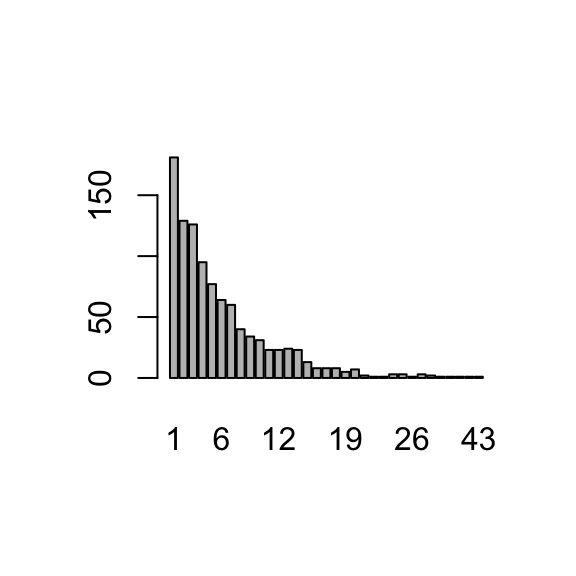
plot(as.factor(result))